Authentication
Arguments
When you integrate Notifir web component into your application (website), you need to pass apiKey, userId and userHmac. You pass both userId and userHmac to prove that you have an access. apiKey is passed to associate you with a project and verify the authentication using the project's apiSecretKey.
| Argument | Description |
|---|---|
| apiKey | The public API key of your project, which is safe to store on the client-side and share over the network |
| apiSecretKey | The secret API key of your project, which is used in HMAC algorithm and should never be shared or exposed on the client-side |
| userId | The user id, which is usually email (but not required to be an email) |
| userHmac | The HMAC code of the user's id, which is generated on the backend using the apiSecretKey and used for authentication |
When you create a project you get both public and secret API keys automatically generated for you.
Algorithm
HMAC authentication algorithm is described on the diagram below.
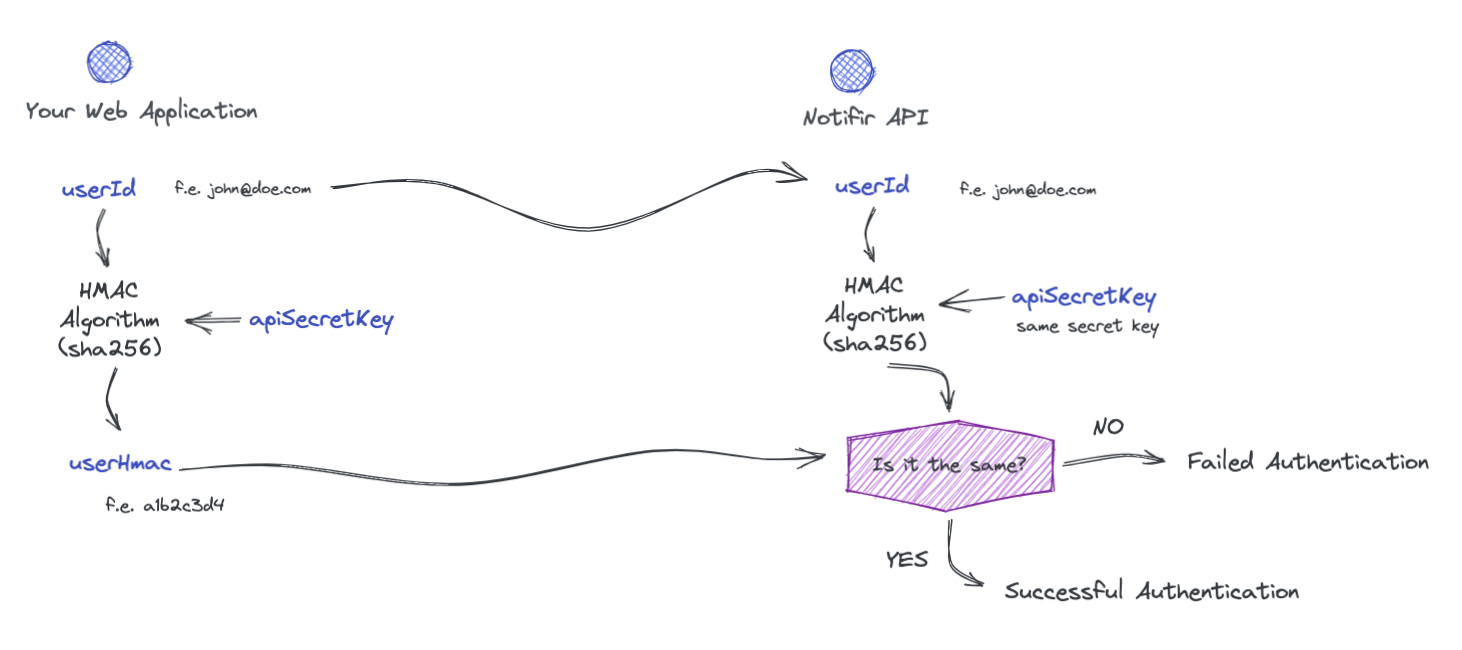
When you initialize Notifir web component in your application, you provide your project's public API key and a user's ID (f.e. email). A savvy user can open their browser's developer console and obtain your project's public API key with this setup. They can then initialize the inbox with your public API key but with a different user id and start viewing that user's notifications. To prevent that, the HMAC authentication algorithm comes in play. It's not enough to have project's public key and user id to view user's notifications. You need to prove the access by providing the userHmac code. The only way to obtain that code is to execute the HMAC algorithm using both user id and project's secret API key. The same algorithm is executed on the Notifir's API and can guarantee that the user is authorized to see notifications.
Remember that this authentication mechanism is secure as long as your secret API key is kept safe. Never publish it anywhere or expose it on the client-side code!
When using user id in the web component, it MUST be lowercase.
HMAC
Use your project's API secret to compute an HMAC code of the user's id on your server. Do not perform the calculation of the HMAC in the client.
NodeJS
const userHmac = crypto .createHmac('sha256', NOTIFIR_API_SECRET) .update(userId) .digest('base64')Java
import javax.crypto.spec.SecretKeySpec;import javax.crypto.Mac;import java.security.InvalidKeyException;import java.security.NoSuchAlgorithmException;import java.util.Base64;class NotifirAuth { private static final String HMAC_SHA256 = "HmacSHA256"; public static String calculateHMAC(String data, String key) throws InvalidKeyException, NoSuchAlgorithmException { SecretKeySpec secretKeySpec = new SecretKeySpec(key.getBytes(), HMAC_SHA256); Mac mac = Mac.getInstance(HMAC_SHA256); mac.init(secretKeySpec); return encodeToBase64(mac.doFinal(data.getBytes())); } private static String encodeToBase64(byte[] bytes) { return Base64.getEncoder().encodeToString(bytes); }}class Main { public static void main(String[] args) throws InvalidKeyException, NoSuchAlgorithmException { String hmac = NotifirAuth.calculateHMAC("user@example.com", "NOTIFIR_API_SECRET"); System.out.println(hmac); }}Ruby
digest = OpenSSL::Digest::Digest.new('sha256')user_hmac = Base64.encode64(OpenSSL::HMAC.digest(digest, NOTIFIR_API_SECRET, user_id))Usage
To start using it on the client, provide the HMAC code in the userHmac property of web component. You still need to set your public API key and the user's id in addition to that.
<notification-bell apiUrl="http://localhost:3001/api/graphql" apiKey="YOUR_API_PUBLIC_KEY" userId="user@example.com" userHmac="YOUR_USER_HMAC_FROM_PREVIOUS_STEP"></notification-bell>